How to Access OpenStack CLI
To interact with your OpenStack environment, you need a UNIX-based system (e.g., Ubuntu) and set the appropriate environment variables. These variables include the OpenStack authentication URL, username, password, and project ID. To download an already created environment variable file (OpenRC file):
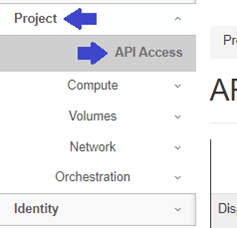
Login to your dashboard and navigate to the "API Access" under the "Project" section.
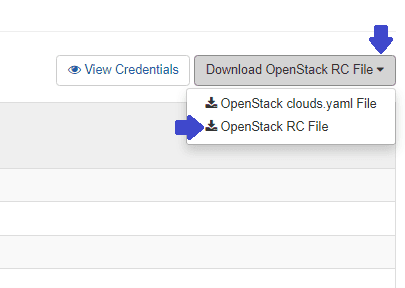
Click on "Download OpenStack RC File" and then click on "OpenStack RC File" to download the openrc file, which contains the necessary environment variables.
Save the file to your machine.
After obtaining the OpenRC file, transfer it to your UNIX-based system.
Now, install the OpenStack Client by following these commands:
-
Firstly, install Python and PIP, which will be used to install the OpenStack CLI:
sudo apt-get install python3 python3-pip -
Upgrade the PIP package:
pip3 install --upgrade pip -
Then, install the OpenStack Client:
pip3 install python-openstackclient -
Now, source the previously downloaded file. You will be asked to enter the OpenStack password:
source openrc
Now you are successfully logged in.